The short answer
If all you ever do is shrink a video file and you don't mind a dense, technical interface, HandBrake is free and genuinely good — there's no reason to pay for that alone. ReelNox Studio earns its $39 the moment you need anything HandBrake was never built to do: a real timeline editor, merging clips, removing a background, repairing a corrupted file, or just not wanting to hunt through seven tabs to change one setting.
What HandBrake actually is (and why it's stuck around this long)
HandBrake is a free, open-source video transcoder that's been actively developed since 2003. It runs on Windows, macOS, and Linux, it's licensed under GPL v2, and it's built entirely by volunteers. As of version 1.7, it supports hardware encoding through NVIDIA NVENC, Intel Quick Sync, AMD VCN, and Apple VideoToolbox — including AV1, which it added before most paid competitors did.
None of that is an exaggeration. HandBrake is a legitimately excellent transcoder, and for a huge number of people — "take this video file and make it smaller" — it's the correct free answer. This comparison isn't about whether HandBrake is good. It's about what it was never designed to do.
Feature-by-feature, no spin
A side-by-side, without pretending HandBrake loses everywhere — it doesn't.
| — | ReelNox Studio | HandBrake |
|---|---|---|
| Price | $39, once, lifetime | Free, forever |
| Platforms | Windows 10 / 11 only | Windows, macOS, Linux, FreeBSD |
| License | Closed-source, code-signed installer | Open source (GPL v2), community-built |
| GPU hardware encoding | NVENC, AMD AMF, Intel QSV | NVENC, QSV, AMD VCN, VideoToolbox — plus AV1 |
| Output codecs | H.264, H.265, VP9 | H.264, H.265, VP9, AV1 |
| Interface | One streamlined app, no tab-hunting | 7 tabs — Summary, Dimensions, Filters, Video, Audio, Subtitles, Chapters |
| Multi-track timeline editor | Yes — unlimited tracks, blade tool, 50-step undo | Not available |
| Merge multiple clips | Yes, dedicated Merge tool | Not supported at all |
| AI background removal | Yes, fully on-device | Not available |
| Corrupted file repair | Yes — 4 strategies + Freeze Scanner | Not available |
| Account or telemetry | None, ever | None, ever |
| Updates | Signed, one click, in-app | Manual download from the site |
The interface is where most people actually decide
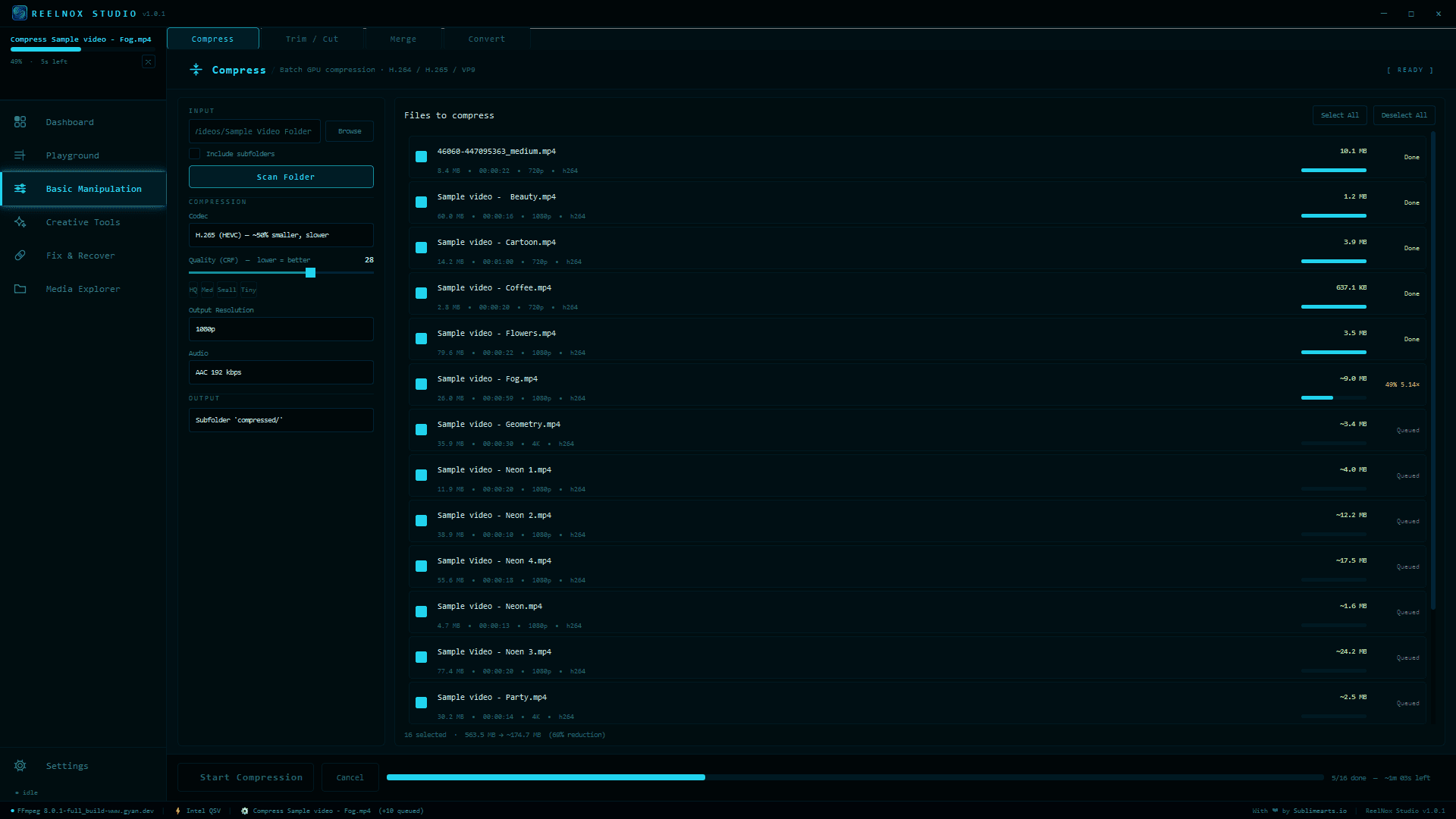
Open HandBrake for the first time and you're looking at seven tabs — Summary, Dimensions, Filters, Video, Audio, Subtitles, Chapters — each with its own dropdowns and sliders. It's not badly designed, it's just built for people who already know what a CRF value or a constant framerate is. If you don't, the learning curve is real, and it's the single most common complaint you'll find about HandBrake on Reddit and forums. ReelNox Studio picks one job per screen — Compress, Trim, Merge, Convert — and gets out of the way. Drop files in, pick a quality target, export. There's a Settings panel if you want to dig into GPU diagnostics, but you never have to.
What HandBrake was never trying to be
HandBrake is a transcoder: one file in, one smaller or converted file out. That's the whole job description, and it does that job well. It was never designed to be an editor, a repair tool, or a creative suite — so it isn't one, and that's not a knock against it. ReelNox Studio starts from a different premise: most people who compress video also eventually need to trim it, merge it with another clip, pull the background out of it, or recover it after it got corrupted. Rather than installing four separate tools for that, it's all in one app.
Multi-track timeline editor
Unlimited video/audio tracks, blade tool, magnetic snapping, live compositing preview, on-canvas crop and transform.
Merge
Combine multiple clips into one, in order — something HandBrake's own documentation says it doesn't support.
Background remover
On-device AI (MediaPipe for speed, rembg for any subject) — swap or remove a background, no green screen needed.
V2ASCII
Renders footage as moving ASCII art, with live color controls. Nothing else on this list does this.
GIF Maker
Two-pass palette GIFs, sized to actually look good instead of just technically working.
Smart Cuts
Auto-trims dead air or splits by scene, without eyeballing a waveform.
Frame Cleanup + Freeze Scanner
Finds and trims the frozen tail recording software leaves behind, and flags suspect static spans before you ship a file.
4 corrupted-file repair strategies
For files that won't open at all — not something a transcoder is built to handle.
So which one should you actually use?
Stick with HandBrake if:
- –You only ever need to shrink or convert a single file, nothing more
- –You're on macOS or Linux
- –You specifically want AV1 output, or full open-source transparency
- –You don't mind a technical, settings-heavy interface
Get ReelNox Studio if:
- ✓You're on Windows and want compression without the tab-hunting
- ✓You need to trim, merge, or convert clips as part of the same workflow
- ✓You want background removal, ASCII rendering, or GIF-making without installing separate apps
- ✓You've ever had a recording go corrupt or freeze at the end with no way to fix it
There's no dishonest answer here: if compression is genuinely the only thing you need, HandBrake is free and it's good — paying for ReelNox Studio to do that one single job isn't a smart trade. But the moment your workflow needs a second or third tool around that compression step, ReelNox replaces all of them with one $39 lifetime license instead of a folder full of separate downloads.
Try ReelNox Studio free for 7 days
Every tool at full capability. No credit card. $39 once, only if you decide to keep it.
🎬 ReelNox Studio →About
Patrick Chen — indie developer behind Sublimearts.io. Built ReelNox Studio after years of switching between five different tools just to finish one video.